


Home Security Camera: Camerito
4.422.00 Reviews
App Specs
- Version
- 4.8.0
- Updated On
- License
- Free
- Downloads
- 10,000+
- Developer
- TappyTaps s.r.o.
- Categories
- House & Home
- Platform
- Android
Screenshots
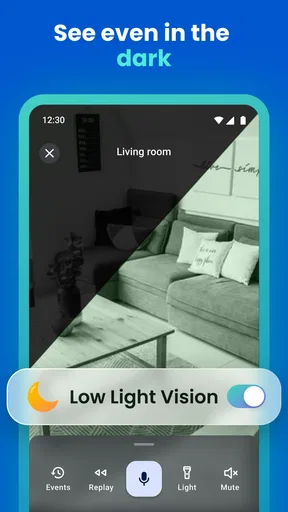
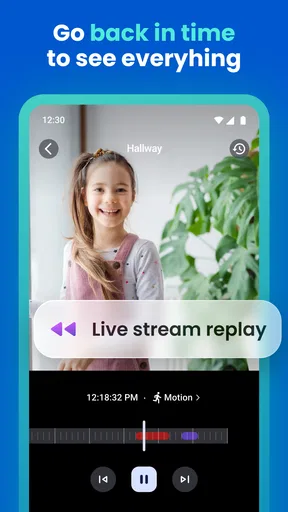
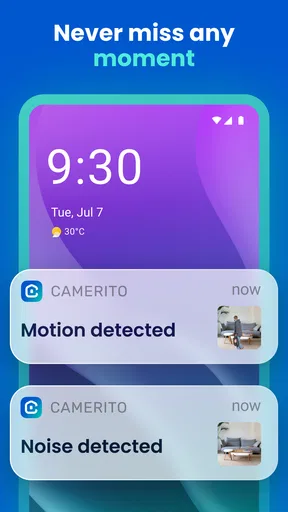
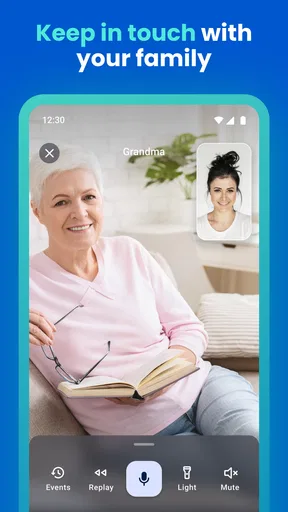
 Analysis by AppCompare
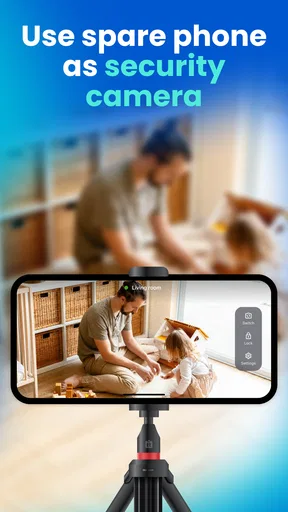
A spare phone can be more useful than a drawer-filler, and Camerito: Home Security Camera gives it a practical second life: it can serve as a home camera while your everyday phone is the one you use to check in. I find that idea appealing for small, temporary jobs—keeping an eye on a pet, checking a room while I’m out, or seeing whether a delivery has arrived. It is not a replacement for a dedicated alarm system, but it offers a straightforward way to reuse a device you already own.
Why the old-phone approach can be handy
A dedicated security camera is usually the more natural choice if you want a permanent installation, but it also means buying and placing another device. With Camerito, the camera phone is already in your home, and the app’s central appeal is turning that existing hardware into a viewable camera with alerts and clips. That makes the most sense when you need a simple extra set of eyes rather than a complete security setup.
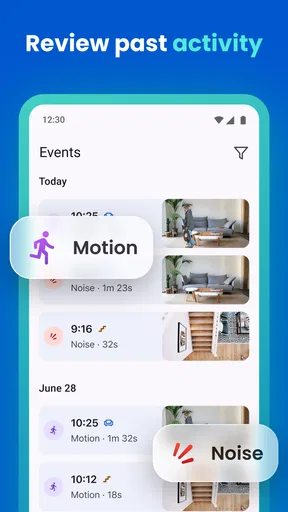
There is a useful distinction between watching a room continuously and using alerts to decide when to check in. If you are away for a short errand, a motion notification can help you decide whether a live view is worth opening. For a long day out, though, repeated alerts may become noise unless you position the phone carefully and choose a sensitivity that suits the room.
Setting Up Your Mobile Fortress
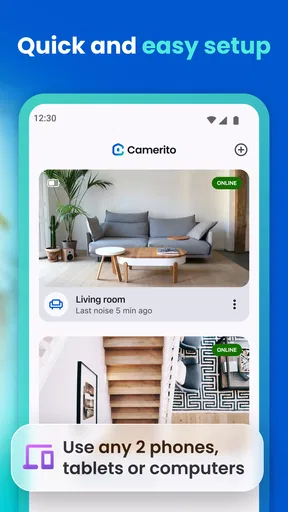
First things first, getting started with Camerito: Home Security Camera is a breeze. You download the app on both your current phone and the old one you want to use as a camera. Once that’s done, you follow the simple on-screen instructions to pair them up. The process is smooth, and even if you’re not a tech wizard, you’ll find it straightforward. Honestly, I was sipping my coffee and had the setup done before it went cold.
The Features That Stand Out
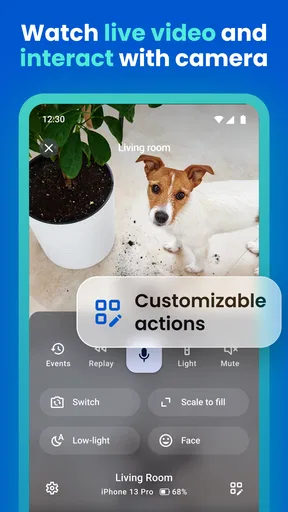
Okay, let’s talk features because this app is packed with them. The real-time streaming is surprisingly clear, and you can access it from anywhere. Whether you’re at work or on a beach vacation, you’ll have eyes on your home. The motion detection is another biggie. You get alerts whenever there’s movement, so you’re always in the loop. Plus, you can adjust the sensitivity, which is a lifesaver if you have pets wandering around.
Another cool feature is the two-way audio. Imagine catching your dog in the act of chewing up your favorite slippers and telling him to knock it off right then and there. It’s like being home, even when you’re not.
Making alerts useful instead of distracting
Placement matters more than it might seem. Aim the camera at the area you actually need to monitor, rather than a busy walkway or a window where changing light can create visual activity. If a pet wanders through the room, start with a position that shows the main area but avoids capturing every corner; then adjust motion sensitivity if notifications arrive too often. This small bit of setup can make alerts more actionable and less likely to be ignored.
Worth Reading Before You Choose

Flipboard Shows What News Apps Must Do Beyond the Feed

Switching to Android Auto Means Rethinking Your Driving Routine

Google Calendar Makes a Crowded Week Easier to Manage

Ludo King Makes the Most of the Minutes Between Plans

Baby Panda World Brings Quick Play to Modern Phones, but Its Game Library Feels Busy

ESPN’s Live Game View Makes Following Close Games Easier
Two-way audio is best treated as a way to communicate briefly, not as a guarantee that you can manage a situation remotely. It could help you call a pet or speak to someone in the room, but it depends on both phones having a working connection and being placed where sound can be heard. I would test the audio while at home before relying on it when away.
A realistic day-to-day use
Picture leaving for work and wanting to check whether a dog has settled after you go. The old phone can stay aimed at the part of the room where the dog spends time; if an alert comes through, you can open the live view and decide whether to use two-way audio. That is a more sensible role for this kind of setup than expecting it to provide a full record of every event or replace a monitored alarm.
It can also suit a short-term need, such as checking a room during a move or keeping an eye on a sleeping child while you are elsewhere in the home. For any private space, think carefully about who can access the viewing phone and where it is pointed. A camera is only useful when its placement respects the people who share the space.
Why Go With Camerito?
Now, you might wonder why you should choose this app over others. Well, for starters, it’s free. That’s right, no hidden fees or subscriptions. It’s a budget-friendly option that doesn’t skimp on quality. Plus, the app interface is super user-friendly. Everything’s laid out in a way that just makes sense. You won’t be fumbling through settings trying to figure things out.
Also, the app offers cloud storage for a small fee, which is perfect if you want to keep a record of what’s happening at home. But if you’re a privacy buff, you can also choose to save everything locally on the device.
Storage, privacy, and choosing the right tool
Before deciding how to keep clips, consider what you need them for. If you mainly want to check a live view when an alert arrives, saved footage may matter less than having a stable connection and a reliable power source. If you want a record to review later, storage becomes part of the decision. The app is free to install, with in-app purchases listed from $2.99 to $17.99 per item, so check the options in the app and weigh any paid feature against how often you will use it.
Local storage may feel more comfortable if you prefer footage to remain on the camera device, while cloud storage can be more convenient when you want clips available away from home. Neither choice removes the need to protect the phones themselves: use a secure screen lock on the camera phone, keep access to the viewing phone private, and avoid pointing the camera at areas that do not need monitoring.
Compared with buying a conventional indoor camera, this approach saves you from purchasing another camera, but it asks more of an old phone. You need to keep that device positioned, powered, connected, and available for the camera role. A dedicated camera is likely a better fit for permanent coverage or a setup where you want purpose-built hardware. Camerito is more compelling when the need is modest, the spare phone is dependable, and flexibility matters more than a fixed installation.
Potential Hiccups
Of course, no app is perfect. While Camerito works great most of the time, there are occasional connectivity issues. Sometimes, the stream might lag or the app might drop the connection. It’s not a dealbreaker, but it can be annoying if you’re counting on it for security at all times.
Battery life is another consideration. Keeping an old phone plugged in all the time isn’t ideal, so make sure you have a reliable power source or a good backup battery pack.
Who gets the most from it
I would recommend this kind of setup to someone who already has a spare phone and wants a low-commitment way to check one room. It is especially suitable for occasional monitoring, pet check-ins, or a temporary need where buying a separate camera feels excessive. The developer, TappyTaps s.r.o., has made an app in the house-and-home category that keeps the basic idea easy to understand: one phone watches, another lets you look in.
I would skip it if you need dependable, uninterrupted security coverage, want a camera that can be installed and forgotten, or cannot leave a phone safely powered in the chosen spot. An old device with a weak battery, unreliable connection, or poor camera position can undermine the whole arrangement. For serious security needs, a dedicated camera or a professionally designed system is the more appropriate choice.
For people deciding whether to try it, the practical questions are simple: do you have a spare phone that can stay in place, is there a useful angle on the area you care about, and will you be comfortable with the chosen storage option? If the answers are yes, it is worth testing the view and alerts while you are still at home. The app is free, is rated for Everyone, and has an average rating of 4.3 from around 312 ratings, with over 10K installs. It was released on November 19, 2024, and version 4.2.1 requires Android 7.0 or later.
Final Thoughts
All in all, Camerito: Home Security Camera is a fantastic tool for anyone looking to boost their home security without spending a fortune. It’s simple to set up, easy to use, and offers a range of features that make it a solid choice. While there are a few minor drawbacks, the overall package is impressive. So, if you’ve got an old phone collecting dust, why not put it to good use?
Looking to give it a try? You can download Camerito: Home Security Camera from the App Store or Google Play and start safeguarding your home today.
Pros
- Easy setup with intuitive interface.
- Supports multiple camera connections.
- Motion detection alerts are reliable.
- Cloud storage options available.
- User-friendly app navigation.
Cons
- Limited free storage capacity.
- Occasional lag in video streaming.
- Requires strong Wi-Fi connection.
- Some features behind paywall.
- Ads can be intrusive in free version.
FAQs for Home Security Camera: Camerito
What features does Camerito: Home Security Camera offer?
Camerito: Home Security Camera provides a range of features including live streaming, motion detection alerts, two-way audio communication, and night vision. It also supports cloud storage and allows for multiple camera feeds, making it a robust option for ensuring home security from anywhere in the world.
Is Camerito compatible with both Android and iOS devices?
Yes, Camerito is designed to be compatible with both Android and iOS devices. This cross-platform compatibility ensures that users can access their security feeds and manage settings from any smartphone or tablet, regardless of the operating system they use.
Does Camerito require a subscription for full access?
Camerito offers both free and premium subscription options. While the free version provides basic features, a subscription is required for advanced functionalities such as extended cloud storage, advanced motion detection, and priority customer support. Users should evaluate their needs to determine if the premium plan is necessary.
How secure is my data with Camerito?
Camerito places a strong emphasis on user data security. It employs encryption protocols to protect video feeds and personal information. Additionally, users can set up two-factor authentication for added security, ensuring that their home surveillance data is kept private and secure.
Can I integrate Camerito with other smart home devices?
Camerito supports integration with various smart home ecosystems such as Google Home and Amazon Alexa. This allows users to control their cameras using voice commands and to create automated routines that enhance home security, providing a seamless smart home experience.


